![]() | | ||||||||
| | #1 |
| Advanced Warrior Join Date: Oct 2008 Location: West Sussex, UK
Posts: 601
Thanks: 264
Thanked 189 Times in 134 Posts
|
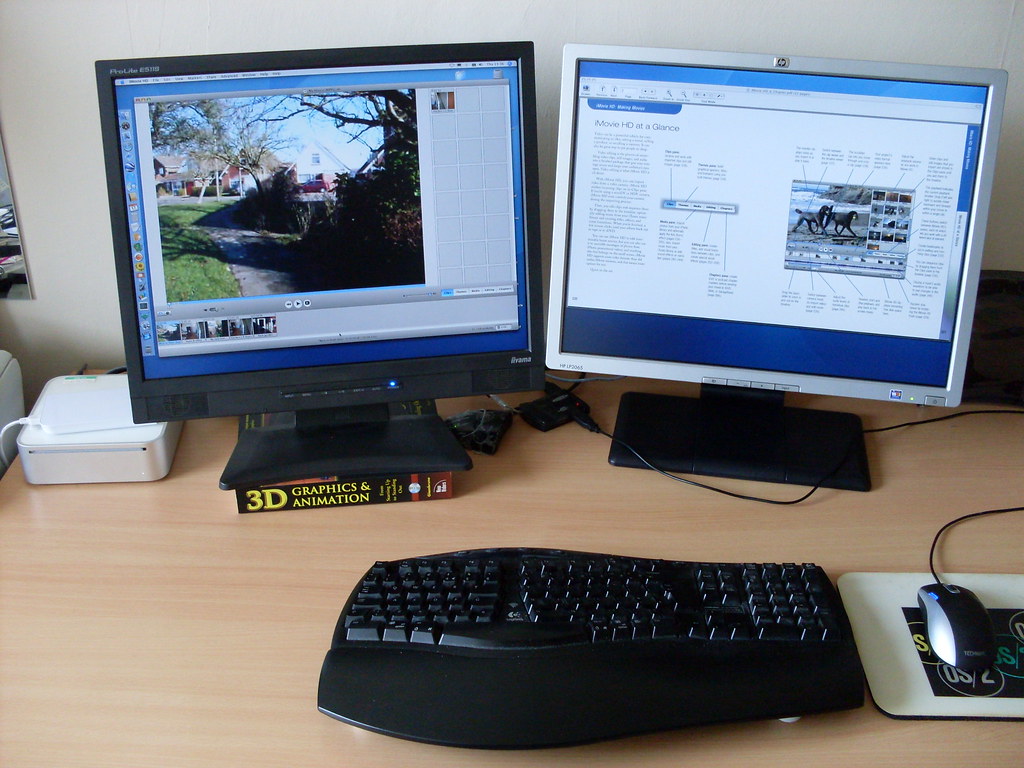
In case other warriors are interested in expanding the size of their computer's "desktop", gizmos now exist that allow you to connect a second (or third, or fourth...) screen to a spare USB 2.0 port. At first, I was very sceptical about them ("Connect a screen to a USB port? That'll never work!") but I've bought one and it does indeed give you a second screen with which to work. The small black box that you can see with the blue light in the photo below is made by EVGA and the model is called "UV Plus+ UV-16" (snappy, eh?). There are other makes/models, but this is the one that I've bought. It'll drive a monitor up to a 1600x1200 resolution. ![]() Here is the setup with the cables tidied away... (iMovie gets a screen to itself on the left-hand screen, while a tutorial PDF teaching me how to use iMovie can be stretched to occupy all of the right-hand screen) ![]() Okay, if you want to know anymore, just ask! |
| | |
| | #2 |
| HyperActive Warrior War Room Member Join Date: Jun 2008 Location: United Kingdom.
Posts: 331
Thanks: 118
Thanked 62 Times in 56 Posts
|
That's a great idea thanks. I've just bought a second laptop to do the same thing!! silly me well I know better now, perhaps I'll do this in the future on my desk. Keren |
|
Have a great day
| |
| | |
| | #3 |
| HyperActive Warrior War Room Member Join Date: Jan 2009 Location: UK, Watford
Posts: 233
Thanks: 66
Thanked 53 Times in 43 Posts
|
You have spare USB ports!?! With everything being USB these days, I'm constantly swapping attachments. But I do agree, having 2 monitors is so useful. |
|
Get access to all the video content you could ever need to create your own awesome video ads. Warrior Special Offer the ULTIMATE Niche Marketers Video Archive Tailor-made videos for business, by digileaf Succeed in video marketing www.digileaf.co.uk | |
| | |
| | #4 |
| Active Warrior Join Date: Dec 2008
Posts: 94
Thanks: 2
Thanked 2 Times in 2 Posts
|
That's awesome thanks for sharing. It is really handy to shift screens over to a standby monitor while you work on your 'active' monitor. Choices choices choices...
|
| | |
| | |
| | #5 |
| HyperActive Warrior Join Date: Aug 2008 Location: Cheshire
Posts: 122
Thanks: 0
Thanked 0 Times in 0 Posts
|
Thanks for the info - useful !
|
| Jack Stone - Who strongly believes that helping others is the best way to help yourself ! | |
| | |
| | #6 | |
| Advanced Warrior Join Date: Oct 2008 Location: West Sussex, UK
Posts: 601
Thanks: 264
Thanked 189 Times in 134 Posts
| Quote:
![]() ![]() In the subject line, I said that this was cheap. Just to give everyone an idea of what "cheap" means, I bought the 20" HP screen (the one with the silver bezel) which has a native resolution of 1600x1200 pixels from eBay for £100. The EVGA UV Plus+ UV-16 usually sells for about £55, but I discovered that Novatech (near Portsmouth, UK) sell them for £35. So in total, doubling my desktop space cost me £135. And when compared to spending money on other aspects of a computer (memory, bigger hard disk), this has been noticeably useful -- an upgrade where you can instantly see the difference. | |
| | |
| | #7 |
| Beware - Straight Talker War Room Member Join Date: Jan 2004 Location: United Kingdom
Posts: 9,263
Blog Entries: 25 Thanks: 1,180
Thanked 4,492 Times in 1,497 Posts
|
I love those -I connected 8 of them to one computer when I was speaking at an event in Singapore last year, they're cool. But I did find that occasionally they would go weird, but I think that was because the connections need to be solid on the cables or they're temperamental. |
| | |
| | |
| | #8 |
| Banned War Room Member Join Date: Jun 2007 Location: Up North, USA
Posts: 2,517
Blog Entries: 11 Thanks: 88
Thanked 288 Times in 157 Posts
|
I actually bought two used Dell laptops for $200 each and used those. When FF freezes up your computer, the other two "screens" keep going ![]() TomG. |
| | |
| | #9 |
| Advanced Warrior Join Date: Oct 2008 Location: West Sussex, UK
Posts: 601
Thanks: 264
Thanked 189 Times in 134 Posts
|
You're right Andy, the connections do have to be carefully managed. Another consideration, is the speed of your CPU. These gizmos don't have a Graphics Processing Unit of their own, so they put the workload of updating the picture onto the CPU. The more monitors you add, the faster your CPU needs to be! |
| | |
| | #10 |
| Advanced Warrior Join Date: Oct 2008 Location: West Sussex, UK
Posts: 601
Thanks: 264
Thanked 189 Times in 134 Posts
| |
| | |
| | #11 | |
| Beware - Straight Talker War Room Member Join Date: Jan 2004 Location: United Kingdom
Posts: 9,263
Blog Entries: 25 Thanks: 1,180
Thanked 4,492 Times in 1,497 Posts
| Quote:
You can add as many as you like - Like I said, I used 8 of them with one computer and it was fine. They're the cheapest way I've seen. I also have a 6 monitor system but for that one I have a special video card which drives 6 monitors and it wasn't cheap. | |
| | ||
| | |
| | #12 |
| Advanced Warrior Join Date: Oct 2008 Location: West Sussex, UK
Posts: 601
Thanks: 264
Thanked 189 Times in 134 Posts
|
The particular model of USB-to-DVI adapter that I've bought allows up to 6 monitors to be added to a single computer. But as I mentioned in reply to Andy Henry, the more monitors you add, the quicker your CPU has to be, because it's the CPU that's calculating any changes in the image on those screens. Naturally, having 6 screens of spreadsheets is a lot less taxing for the CPU than trying to play movies. |
| | |
| | #13 |
| HyperActive Warrior War Room Member Join Date: Aug 2008 Location: Iowa
Posts: 296
Thanks: 123
Thanked 77 Times in 65 Posts
|
I always wanted to ask this: You have one mouse but how does that work with two screens? Do you just move your mouse to the right/left and it takes over on the 2nd screen? Does that even make sense? Heads a bit foggy from a cold. |
| | |
| | #14 | |
| Advanced Warrior Join Date: Oct 2008 Location: West Sussex, UK
Posts: 601
Thanks: 264
Thanked 189 Times in 134 Posts
| Quote:
So, if your pointer's on the left-hand screen, you can just keep moving it to the right. And as it disappears into the right-hand side of the left-hand display, it re-appears on the left-hand side of the right-hand display. You can just drag windows from one screen to the other. | |
| | |
| | #15 |
| Warrior Member Join Date: Oct 2008
Posts: 12
Thanks: 1
Thanked 0 Times in 0 Posts
|
i've always wanted a 2nd monitor way more productive |
| | |
| | #16 |
| Advanced Warrior Join Date: Oct 2008 Location: West Sussex, UK
Posts: 601
Thanks: 264
Thanked 189 Times in 134 Posts
| Yeah, and now you can add that second monitor really cheaply. Because the USB-to-DVI adapter is an external device, you don't lose it when you sell/give away/junk your existing computer. When you upgrade your PC/Mac to another model, you can move one of these gizmos over to your new machine! |
| | |
| | #17 |
| Senior Warrior Member War Room Member Join Date: Dec 2008 Location: Sunny So Cal
Posts: 2,368
Thanks: 358
Thanked 400 Times in 269 Posts
|
Ive had 2 monitors since Matrox made dual head video cards ... when the card was > $200 and my LCD's were $700 each! About 10 yrs now I think. I cannot fathom doing it any other way - well except for maybe a 32" wide screen 1080p in super hi rez mode ![]() I find it soooo much more productive for the day job especially. |
| 30 WP Blogs-30 IPs-Private Network - Index Your Backlinks - Rank Keywords Like Hardcore SEO's Discounted Backlink Energizer WSO $27 Get It Now On Sale Before 2.0 Release Price Increase! | |
| | |
| | #18 |
| Warrior Member Join Date: Oct 2008
Posts: 14
Thanks: 0
Thanked 8 Times in 2 Posts
|
Dual screens are so much more efficient. I use dual Dell 24" LCD's and prior to that dual 22" CRT. Wouldn't ever go back!
|
| Download Flexibility Theme today and have the World's most customizable WP theme!
| |
| | |
| | #19 |
| Cranky Old Bald Guy War Room Member Join Date: Dec 2007 Location: Florida , USA.
Posts: 459
Thanks: 300
Thanked 280 Times in 177 Posts
|
Its like going from dialup to broadband. Once you use multiple monitors you'll be ruined for ever using just one again. Tom |
| When you hear someone telling you what YOU can't do, they are usually talking about what THEY can't do. | |
| | |
| | #20 |
| Active Warrior Join Date: Feb 2009
Posts: 52
Thanks: 4
Thanked 0 Times in 0 Posts
|
That is just awesome! Thanks for sharing, John! I'll look on ebay for a USB-to-DVI adapter .
|
| | |
| | #21 |
| Advanced Warrior Join Date: Oct 2008 Location: West Sussex, UK
Posts: 601
Thanks: 264
Thanked 189 Times in 134 Posts
| |
| | |
| | #22 |
| Warrior Member Join Date: Aug 2008 Location: Las Vegas, Nevada
Posts: 66
Thanks: 0
Thanked 2 Times in 2 Posts
|
wow thas great, Im thinking of doing this asap!!!
|
| | |
| | #23 |
| Advanced Warrior Join Date: Oct 2008 Location: West Sussex, UK
Posts: 601
Thanks: 264
Thanked 189 Times in 134 Posts
| |
| | |
| | #24 | |
| Advanced Warrior War Room Member Join Date: Feb 2005 Location: Detroit, Michigan
Posts: 651
Thanks: 1
Thanked 15 Times in 8 Posts
| Quote:
(No it's not an affiliate link) That splitter will work on XP or Vista, it's only $5.99. You plug it into the video card and then you have 2 plugs for your monitor cables. If you have a laptop you can just plug in the monitor to the side of the laptop and adjust the Display Properties so that they both display (this is what I do). I have a 19" widescreen on the laptop with a 19" LCD monitor for the 2nd monitor. **WARNING- Once you do this you will never go back! It will ruin you for life!** Additionally, for your USB problem you can buy a USB hub that will let you plugin a bunch more USB devices. Here's what I have plugged into my CPU: 1- Printer 2- Backup drive 3- Computer fan 4- Wireless mouse All of that stuff is plugged in to the USB drive and I only have 1 USB port in use (the one that the hub uses) Hope this helps you out a bit! Respectfully, EJ Lear | |
|
The Michigan SEO Experts. Fortune 500 Michigan based web development at a 'small business' rate. My Blog | ||
| | |
| | #25 |
| Active Warrior Join Date: Aug 2007 Location: , , .
Posts: 54
Thanks: 0
Thanked 10 Times in 3 Posts
|
This is great. Thanks for sharing. A few years ago, when I go the multi-monitors route, I had to buy additional graphic cards, plug them into my PC and spent the next few days trying to make the different drivers work together. |
| | |
| | #26 | |
| copy and paste geek War Room Member Join Date: Jan 2005 Location: Calgary
Posts: 1,390
Thanks: 68
Thanked 168 Times in 140 Posts
|
For all the multimonitor fans, Lenovo has a dual monitor notebook. It was over $4000 but the second slightly smaller monitor slides out from behind the first. Quote:
one, and if you need it you can get 6 more usb hubs and hook them up to the first one and have... oops, I lost me, but quite a lot of usb connections. Big Mike had a post in the OT forum about a BBQ driven by about 36 usb cables but they were all built into one computer by someone enthusiastic. | |
|
There are 10 types of people, those that understand binary and those that don't. The KimW WSO | ||
| | |
| | #27 |
| Budding Warrior War Room Member Join Date: Mar 2009 Location: Mumbai
Posts: 183
Thanks: 10
Thanked 56 Times in 35 Posts
|
Thanks.... i 've been looking for something like this for quite some time now! But Is there anything similar to connect a monitor to an LCD TV i have a 25" LCD hdready tv which is a spare and i was thinking about jacking it up with my computer, but it requires a DV cable or somthing...any clues? keep up the good work! |
| | |
| | #28 | |
| Advanced Warrior Join Date: Oct 2008 Location: West Sussex, UK
Posts: 601
Thanks: 264
Thanked 189 Times in 134 Posts
| Quote:
| |
| | |
| | #29 | |
| Advanced Warrior Join Date: Oct 2008 Location: West Sussex, UK
Posts: 601
Thanks: 264
Thanked 189 Times in 134 Posts
| Quote:
| |
| | |
| | #30 |
| HyperActive Warrior War Room Member Join Date: Feb 2009 Location: London, England
Posts: 169
Thanks: 16
Thanked 14 Times in 14 Posts
|
Thanks John This is very timely as I am just replacing a dead laptop to which I'd attached a second monitor. My new Sony all in one doesn't have a monitor port and I'm lost without the second monitor... |
| | |
| | #31 | |
| Advanced Warrior War Room Member Join Date: Feb 2005 Location: Detroit, Michigan
Posts: 651
Thanks: 1
Thanked 15 Times in 8 Posts
| Quote:
I'm using it right now as I type this post, and the company that I work with uses the same setup on over 1000 of their computers. Thanks for your opinion. Respectfully, EJ Lear | |
|
The Michigan SEO Experts. Fortune 500 Michigan based web development at a 'small business' rate. My Blog | ||
| | |
| | #32 |
| Warrior Member Join Date: Feb 2009 Location: Michigan
Posts: 6
Thanks: 0
Thanked 0 Times in 0 Posts
|
You can get a cheap nice 19 or larger CRT monitor off of craigslist for less than 50 most of the time.
|
| | |
| | #33 | |
| Advanced Warrior Join Date: Oct 2008 Location: West Sussex, UK
Posts: 601
Thanks: 264
Thanked 189 Times in 134 Posts
| Quote:
So you're saying that you can take the output of a graphics card running at, say 1600x1200 pixels, and convert it into two separate images across two different screens to create an extended, continuous desktop measuring 3200x1200... using nothing more than a $6 cable splitter? My word, I have learned something new today. | |
| | |
| | #34 | |
| It's in my Signature :-) War Room Member Join Date: Nov 2003 Location: ID, USA.
Posts: 8,754
Blog Entries: 1 Thanks: 248
Thanked 990 Times in 443 Posts
| Quote:
| |
| Optimize Your Video<<|>>Nanacast Review<<|>>Transparent Flash Video<<|>> Transparent FLV Player<<|>>Best Upsell/Downsell System<<|>>VIDEO IN PDF<<|>>Optimize Youtube Video<<|>>Video Popup<<|>> Ultimate Affiliate System<<|>> Physical Continuity System** Best Membership Site System** Secure Video Delivery<<|>> HTML5 Video Player<<|>>Internet Business Ideas Blog | ||
| | |
| | #35 | |
| Advanced Warrior War Room Member Join Date: Feb 2005 Location: Detroit, Michigan
Posts: 651
Thanks: 1
Thanked 15 Times in 8 Posts
| Quote:
Thanks for pointing this out! Respectfully, EJ | |
|
The Michigan SEO Experts. Fortune 500 Michigan based web development at a 'small business' rate. My Blog | ||
| | |
| | #36 |
| Asleep at the keyboard War Room Member Join Date: Jun 2007 Location: United Kingdom
Posts: 539
Blog Entries: 1 Thanks: 89
Thanked 40 Times in 26 Posts
|
Just a quickie. Having spent far too long looking at this this afternoon, it seems that the easiest (and cheapest) option is just to buy a second graphics card. These can come in pretty cheap, and most versions of Windows will recognise both cards and allow you to run dual monitors. This is cheaper than the device mentioned here, and is neater as the extra hardware is tucked away inside the PC instead of hanging around outside. Hope this helps |
|
Turbocharge your backlinks with RSS Autopilot! Special Warrior Offer - Massive discount off the regular fee, and a 50% bigger site allocation! Try it now -> www.rssautopilot.com | |
| | |
| | #37 | |
| Advanced Warrior Join Date: Oct 2008 Location: West Sussex, UK
Posts: 601
Thanks: 264
Thanked 189 Times in 134 Posts
| Quote:
![]() ![]() Take care, John. | |
| | |
| | #38 | |
| Advanced Warrior Join Date: Oct 2008 Location: West Sussex, UK
Posts: 601
Thanks: 264
Thanked 189 Times in 134 Posts
| Quote:
However many computer users use laptops, and in my own case, my Mac Mini has no expansion slots. Hence my delight at finding a USB-based solution to the problem. | |
| | |
| | #39 |
| HyperActive Warrior War Room Member Join Date: Feb 2009 Location: London, England
Posts: 169
Thanks: 16
Thanked 14 Times in 14 Posts
|
Wow, thanks for the Novatech lead. Ordered at 14:00 yesterday and has just arrived (11:30)... and I selected free delivery!
|
| | |
| | #40 |
| Advanced Warrior War Room Member Join Date: Aug 2002 Location: Lagos, Nigeria.
Posts: 690
Blog Entries: 7 Thanks: 121
Thanked 119 Times in 61 Posts
|
Ok dumb question... Why would you need more than one monitor if you're in IM? Isn't that what tabs and windows already do? What kind of extra browsing etc are you doing that requires extra hardware like that? I'm a techdummie so be kind... |
| | |
| | #41 |
| Warrior Member Join Date: Jan 2009
Posts: 29
Thanks: 1
Thanked 1 Time in 1 Post
|
Maybe is a stupid question, or probably you answered already and i missed it, but you can do that also with a laptop? Carter |
| | |
| | |
| | #42 |
| Active Warrior Join Date: Mar 2009
Posts: 39
Thanks: 0
Thanked 2 Times in 2 Posts
|
Great post, I was just looking into buying something to do this... Now you have helped me make up my mind I will forsure be doing this now... again great post thanks for the information
|
| | |
| | #43 | |
| Advanced Warrior Join Date: Oct 2008 Location: West Sussex, UK
Posts: 601
Thanks: 264
Thanked 189 Times in 134 Posts
| Quote:
Have you set it up already? Is working well?
| |
| | |
| | #44 |
| Advanced Warrior Join Date: Oct 2008 Location: West Sussex, UK
Posts: 601
Thanks: 264
Thanked 189 Times in 134 Posts
| Everybody's needs are different, Kunle; I personally find it very useful to have such a big desktop. I can have two outlines, a word processor document and a mindmap diagram on display all at the same time. This is very helpful when you are trying to "piece together" some ideas to create a product.
|
| | |
| | #45 |
| Advanced Warrior Join Date: Oct 2008 Location: West Sussex, UK
Posts: 601
Thanks: 264
Thanked 189 Times in 134 Posts
| |
| | |
| | #46 | |
| Advanced Warrior Join Date: Oct 2008 Location: West Sussex, UK
Posts: 601
Thanks: 264
Thanked 189 Times in 134 Posts
| Quote:
| |
| | |
| | #47 |
| Warrior Member Join Date: Mar 2009
Posts: 20
Thanks: 0
Thanked 0 Times in 0 Posts
|
Thank you, pretty cool advice
|
| | |
| | #48 |
| Backlinks Zombie Master War Room Member Join Date: Jun 2008 Location: Sunny Singapore Island
Posts: 1,642
Blog Entries: 5 Thanks: 37
Thanked 242 Times in 88 Posts
|
Wow ! you can now start watching movie and do your im stuff together !
|
| | |
| | |
![]() |
|
| Tags |
| add, cheap, found, monitor |
| Thread Tools | |
| |
![]() |