Why does Filezilla not connect to the Freehostia.com?

6 replies
I was trying to connect filezilla with freehostia.com

Here's the result:
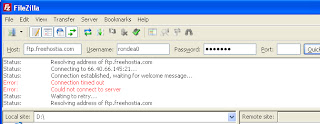


And when I am turning off the windows firewall, the prompt changes to the following:

Status: Waiting to retry...
Status: Resolving address of ftp.freehostia.com
Status: Connecting to 66.40.66.145:21...
Status: Connection attempt failed with "ETIMEDOUT - Connection attempt timed out".

What do I do? Can anyone help me out?
#connect #filezilla #freehostiacom
  • Profile picture of the author wassim
    Possibly you will want to add a port to that connection. Check with your host.

    Also, once in the past I was working on a site that has a very big amount of files on it. We figured out at the end that FileZilla will not connect to the website if it has an extreme amount of files.

    You might want to try an online FTP Client such as Net2FTP.com
    Signature
    {{ DiscussionBoard.errors[3124767].message }}
    • Profile picture of the author schttrj
      Originally Posted by wassim View Post

      Possibly you will want to add a port to that connection. Check with your host.

      Also, once in the past I was working on a site that has a very big amount of files on it. We figured out at the end that FileZilla will not connect to the website if it has an extreme amount of files.

      You might want to try an online FTP Client such as Net2FTP.com
      I already tried with 21-port number. It is not working!
      {{ DiscussionBoard.errors[3124873].message }}
      • Profile picture of the author Myles Sinclair
        Have you previously connected to your account successfully using the same host name, username, and password? If so, it is probably just a temporary hosting issue.

        If this is your first time connecting, check the FTP details you are using are correct. If they are, you should raise a support ticket with Freehostia so they can advise you.
        {{ DiscussionBoard.errors[3125040].message }}
        • Profile picture of the author schttrj
          Originally Posted by Myles Sinclair View Post

          Have you previously connected to your account successfully using the same host name, username, and password? If so, it is probably just a temporary hosting issue.

          If this is your first time connecting, check the FTP details you are using are correct. If they are, you should raise a support ticket with Freehostia so they can advise you.
          No, it is the first time that I am trying to connect the FTP client with the hosting website.
          {{ DiscussionBoard.errors[3125493].message }}
          • Profile picture of the author Myles Sinclair
            Originally Posted by schttrj View Post

            No, it is the first time that I am trying to connect the FTP client with the hosting website.
            In that case check the FTP details are correct. If you still can't connect, you will need to open a support ticket with the host.
            {{ DiscussionBoard.errors[3126692].message }}
  • Profile picture of the author Marvin Johnston
    Originally Posted by schttrj View Post

    I was trying to connect filezilla with freehostia.com
    Status: Waiting to retry...
    Status: Resolving address of ftp.freehostia.com
    Status: Connecting to 66.40.66.145:21...
    Status: Connection attempt failed with "ETIMEDOUT - Connection attempt timed out".

    What do I do? Can anyone help me out?
    I had a similar problem in trying to connect to a site, and the problem turned out to be that I was trying to connect with ftp instead of sftp. My old ftp client didn't support it, so I changed to filezilla.

    Marvin
    {{ DiscussionBoard.errors[3128198].message }}

Trending Topics